
在装饰器, HTTP请求与Typescript中, 我们使用装饰器实现了声明式的API描述与调用, 但问题在于ESLint并不认为这是好的.
为了让ESLint能够识别这个新的用法, 我们需要写一些新的ESLint规则.
1. 这是好的
首先我们需要让ESLint停止将这些变量标记为未使用, 由于我能力有限, 实在没有找到合适的办法, 只能hook原来的no-unused-vars检查函数, 并检查每个被报告为未使用的函数参数是否被装饰器装饰:
import { plugin } from "typescript-eslint";

const OrigNoUnUsedVars = plugin.rules["no-unused-vars"];
const rules = {
    "no-unused-vars": {
        meta: OrigNoUnUsedVars.meta,
        defaultOptions: OrigNoUnUsedVars.defaultOptions,
        create(ctx) {
            const hookedCtx = new Proxy({}, {
                get(target, name, receiver) {
                    if (name === "report") {
                        return function report(data) {
                            const node = ctx.sourceCode.getNodeByRangeIndex(ctx.sourceCode.getIndexFromLoc(data.loc.start));
                            if (node.type === "Identifier") {
                                // 普通参数, e.g. function a (@Deco p: string) {}
                                //                                 ^
                                if (node.decorators?.length > 0 && node.parent.type === "FunctionExpression") {
                                    return;
                                // 带默认值的参数, e.g. function a (@Deco p = "default") {}
                                //                                      ^
                                } else if (node.parent?.type === "AssignmentPattern" && node.parent.decorators?.length > 0) {
                                    return;
                                }
                            }
                            return ctx.report(data);
                        };
                    // 啥也不是
                    } else {
                        return Reflect.get(ctx, name, receiver);
                    }
                }
            });
            return OrigNoUnUsedVars.create(hookedCtx);
        }
    }
}
然后再将其添加回ESLint的ruleset中, 覆盖掉原来的no-unused-vars, 就会发现被装饰器装饰的函数参数不再被报未使用了.
但是这样显然太简单了, 既然都开始写了, 那我们也可以写一些更详细的检查.
2. 人能有多坏?
在一个方法/参数上同时使用多个装饰器
@Get("/")
@Post("/") // 这是坏的!
public a () {}
@Get("/") public a ( @Param("a") @Param("b") a: string // ^^^^^^^^^^^ 这是坏的! ) {}@Get等装饰器的URL参数变量未被声明@Get("/{id}") // ^^^^ 这是坏的! public a () {}@Path装饰器声明的参数在URL中没有对应的变量@Get("/") public a ( @Path("a") a: string //^^^^^^^^^^ 这是坏的! ) {}参数名与装饰器对应的字段的不匹配
由于入参时并不知道每个参数会映射到哪个字段, 所以需要进行一定的约束, 否则会出现@Param("pageNum") pageSize之类的不易被发现的问题.@Get("/") public a ( @Path("a") b: string // ^ 这是坏的! ) {}
我们需要识别这些问题并给出提示.
3. 找出坏人
由于装饰器只能被应用到class上, 考虑只分析MethodExpression.
/** @type { import("eslint").ESLint.Plugin } */
const plugin = {
  rules: {
    "bad-decorator-usage": {
      create(ctx) {
        return {
          MethodExpression(node) {
            // 准备分析...
          }
        }
      }
    }
  }
}先使用typescript-eslint Playground分析我们的错误用例, 将代码贴入编辑框后查看ESTree选项卡(忽略红波浪线, 我们的目的是了解ESLint是如何理解我们的代码的):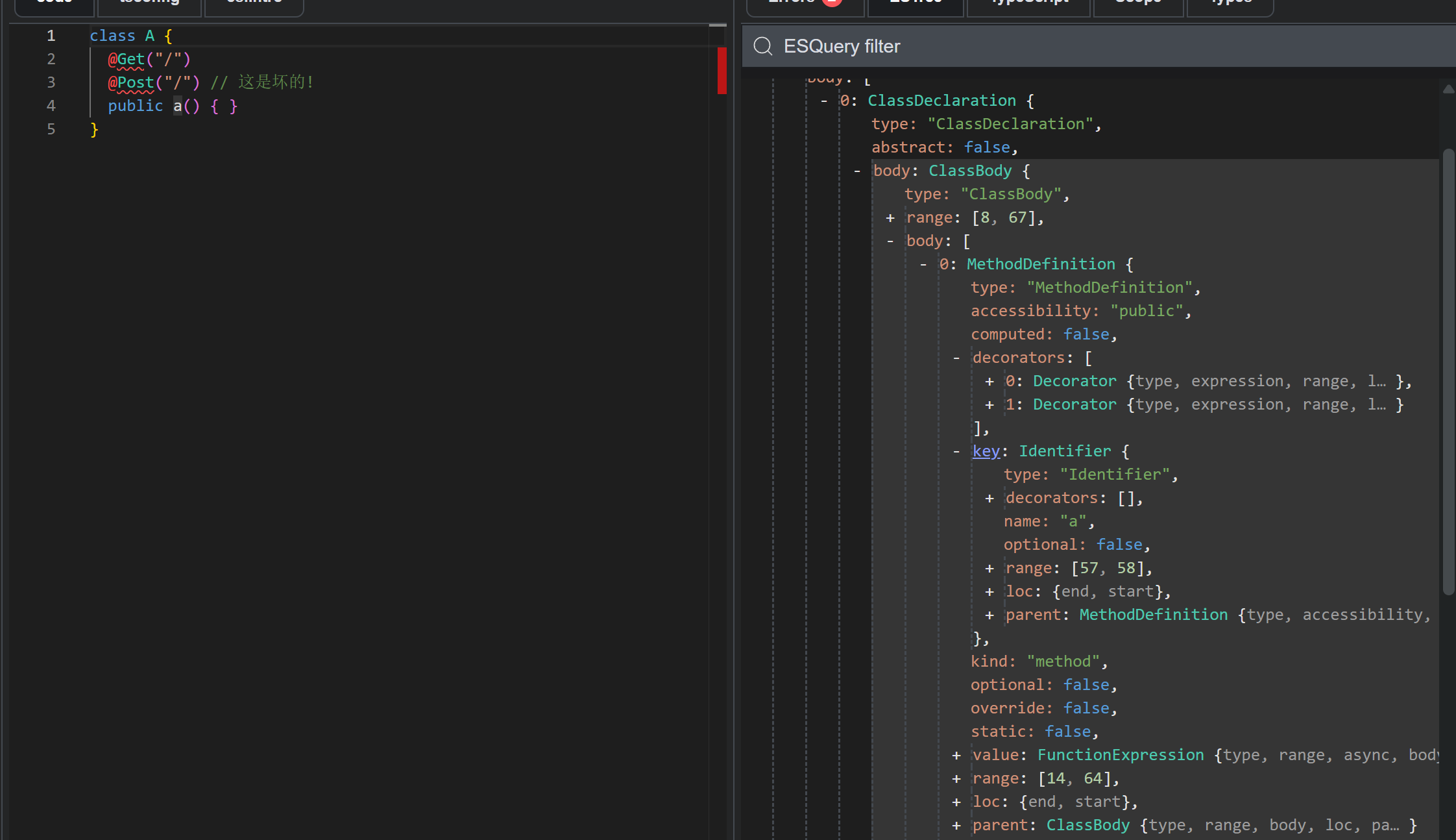
接下来的分析方式也如上所示, 不再贴图.
可以发现ESLint发现我们的方法a上有俩装饰器, 并使用一个数组列出.
故可以直接遍历decorators数组筛选出上面名为Get Post Patch之类的装饰器, 并在数量超过一个的时候发出警告:
const DecoratorNames = ["Get", "Post", "Delete", "Patch", "Put"];
/** @type { import("eslint").ESLint.Plugin } */
const plugin = {
  rules: {
    "only-1-decorator-allowed": {
      create(ctx) {
        return {
          MethodExpression(node) {
             const decorators = node.decorators.filter(d => {
                return d.expression.type === "CallExpression" && DecoratorNames.includes(d.expression.callee.name);
             });
             if (decorators.length > 1) {
               decorators.forEach((d, i) => {
                 if (i === 0) return; // 除了第一个其他都警告
                 ctx.report({
                   loc: d.loc,
                   message: `方法 ${node.key.name} 上最多允许同时存在 1 个 HTTP 装饰器`
                 });
               });
             }
          }
        }
      }
    }
  }
}
// TO BE CONTINUE...